Resources
Marketing Attribution in Salesforce: Ingesting Campaign Data into Your CRM
Connecting paid media spend to closed revenue requires solving marketing attribution in Salesforce, HubSpot, and connected intake platforms at the foundational data layer. When an inquiry enters your pipeline, your CRM must immediately ingest campaign parameters, click identifiers, and referral paths rather than dropping them at the web form or intake call. Without an intentional technical architecture, marketing teams operate blind, relying on top-of-funnel form fills while commercial leadership questions actual pipeline contribution.
By Mike Hulick, Founder, Marketing Powered

What is attribution in digital marketing and why CRMs fail at it
What is attribution in marketing? At an executive level, attribution is the systematic mapping of every buyer touchpoint across paid search ads, organic listings, referral websites, dynamic phone calls, and offline interactions to downstream pipeline velocity, clinical admissions, and verified revenue. Understanding what is attribution in digital marketing requires looking past vanity metrics such as cost per click or gross form submissions. True measurement isolates the precise campaigns, ad groups, keyword themes, and creative assets that produce commercially viable opportunities.
Most enterprise customer relationship management platforms fail at this core task immediately out of the box. CRMs such as Salesforce, HubSpot, and Zoho CRM are relational databases designed to store entity states, pipeline stages, contact details, and sales activities. They do not function as native web analytics engines. When an enterprise configures a basic CRM instance, the intake workflow typically relies on a static dropdown field labeled "Lead Source" containing broad values such as "Web," "Referral," or "Inbound Call."
This standard configuration creates immediate operational failures:
- Intake Personnel Fallback: Intake coordinators or sales development representatives routinely guess the lead source during phone intake, selecting whichever generic option sits at the top of the menu.
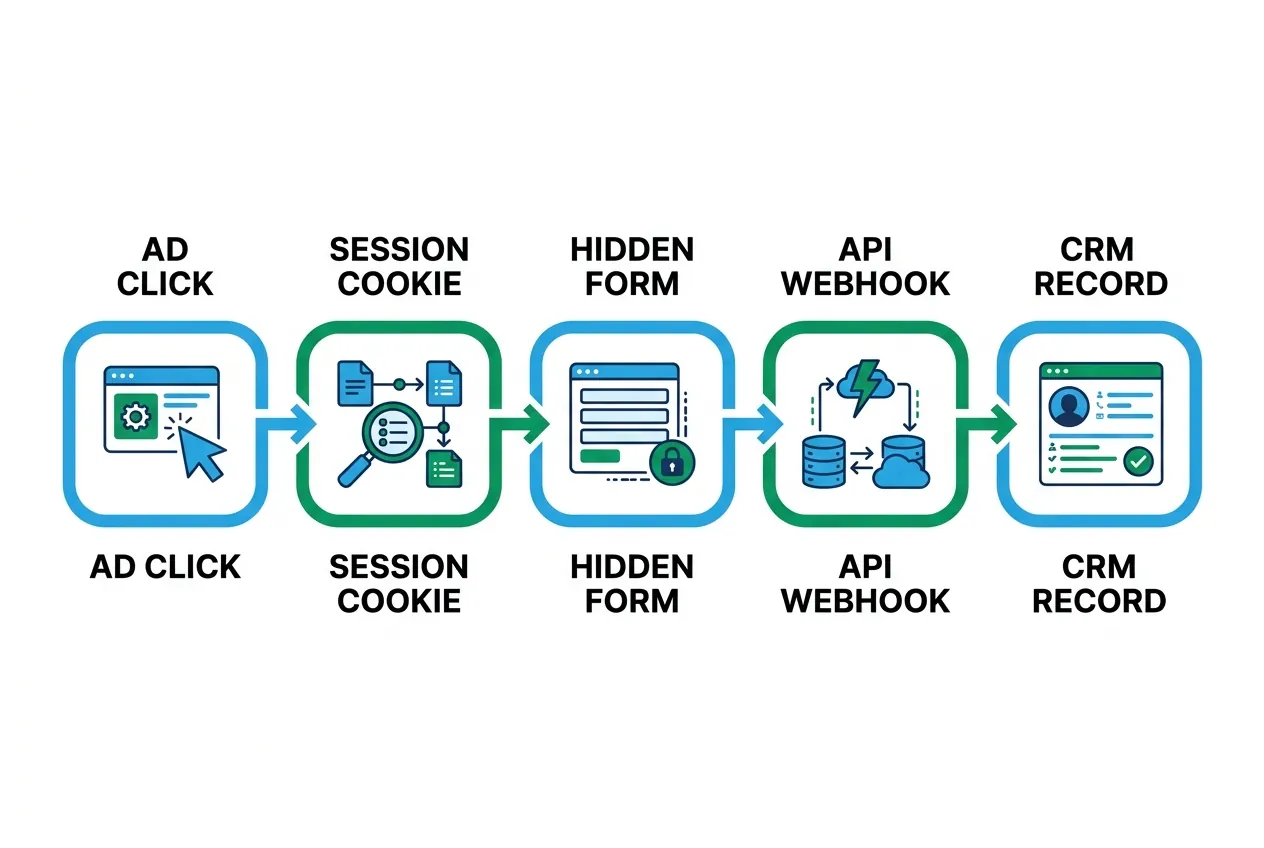
- Session Context Erasure: When a prospective buyer arrives on a landing page via a paid search ad with complex query strings, clicks through three service pages, and completes an embedded form, the original session parameters are stripped unless an underlying script preserves them.
- Single-Touch Bias: Standard CRM objects record only the most recent interaction or the initial record creation point, completely hiding multi-touch journeys that bridge programmatic display, paid search, and high-intent inbound calls.
- Disconnection from Ad Networks: Without passing platform-specific click identifiers into the CRM record, marketing teams cannot send authenticated conversion values back to ad auction algorithms.
When commercial operators review their monthly reports, millions of dollars in paid media investment surface in Salesforce or HubSpot as "Direct Traffic," "Organic Search," or unassigned lead records. Solving this disconnect requires treating the CRM as a structured data warehouse that ingests normalized session payloads at the moment of intake.
Marketing attribution in Salesforce: custom fields and campaign influence
Executing robust marketing attribution in Salesforce requires configuring custom field schemas across multiple core objects and orchestrating automated data transfer during lead conversion. Salesforce does not automatically map uniform resource locator (URL) parameters into records created via standard Web-to-Lead forms or custom API endpoints. Every parameter you intend to analyze must have a designated target field.
Designing Custom Schema on the Lead and Contact Objects
To capture both the initial acquisition touchpoint and the conversion-triggering visit, create two dedicated field sets on the Lead and Contact objects:
- First-Touch Parameters: First_Touch_Source__c, First_Touch_Medium__c, First_Touch_Campaign__c, First_Touch_Content__c, First_Touch_Term__c, and First_Touch_Landing_Page__c.
- Last-Touch Parameters: Last_Touch_Source__c, Last_Touch_Medium__c, Last_Touch_Campaign__c, Last_Touch_Content__c, Last_Touch_Term__c, and Last_Touch_Landing_Page__c.
- Advertising Identifiers: Capture unique click strings including GCLIDc (Google Click Identifier), FBCLIDc (Meta Click Identifier), and MSCLKID__c (Microsoft Advertising Click Identifier).
- Technical Session Context: Store Client_ID__c (analytics client ID), IP_Routing_Path__c, and Referring_URL__c.
Once built on the Lead object, use Salesforce Lead Custom Field Mapping to map each attribute to its corresponding target field on the Contact and Opportunity objects. When an intake coordinator qualifies a lead and executes a conversion, Salesforce transfers these immutable marketing properties into the Opportunity record where deal values, stage progressions, and revenue are managed.
Deploying Salesforce Customizable Campaign Influence
To move beyond single-touch attribution, activate Salesforce Customizable Campaign Influence as outlined in Salesforce Help. This feature allows multiple marketing campaigns to be associated with a single pipeline opportunity, distributing financial credit across touchpoints based on predefined attribution models.
Standard Salesforce configurations link an opportunity only to the Primary Campaign Source field. By deploying Customizable Campaign Influence, growth teams can evaluate:
- First-Touch Models: Allocating 100 percent of pipeline and closed-won credit to the campaign that initiated the original lead record.
- Even Distribution Models: Allocating proportional financial credit equally across every campaign touchpoint recorded prior to opportunity creation.
- Time-Decay Models: Weighting touchpoints progressively higher as they occur closer in time to the opportunity close date.
To operationalize Campaign Influence, configure Salesforce Flow automations. When an inbound form, chat transcript, or call intake payload reaches Salesforce, the automation inspects the incoming campaign metadata, finds or creates the matching Salesforce Campaign record, and inserts a Campaign Member record tied to the Contact with an initial status of "Responded." When an opportunity opens for that account, the Campaign Influence framework automatically recalculates marketing attribution in Salesforce without manual intervention from sales personnel.
Solving marketing attribution in HubSpot: tracking parameters and deal stages
Deploying marketing attribution in HubSpot presents different architectural challenges than Salesforce. HubSpot includes native web tracking scripts that automatically capture traffic sources, but relying exclusively on out-of-the-box properties often misclassifies enterprise pipeline.
Understanding Native Source Properties
HubSpot classifies inbound visits using three automated properties: Original Source, Original Source Data 1, and Original Source Data 2. As detailed in the HubSpot Knowledge Base, HubSpot populates these fields based on the referring domain and specific query parameters detected during the contact's initial browser session. For example, a visit with utm_source=google and utm_medium=cpc categorizes Original Source as "Paid Search," Original Source Data 1 as "Google," and Original Source Data 2 as the campaign name.
However, native HubSpot tracking frequently fails under common enterprise marketing configurations:
- Cross-Domain and Subdomain Transitions: If a user clicks an ad to landingpage.brand.com and navigates to secure.brand.com to submit an inquiry, missing cross-domain tracking tokens cause HubSpot to strip original referral data and reclassify the contact as "Direct Traffic."
- Single-Page Application (SPA) Rerouting: JavaScript client-side routing frameworks often clear query parameters before the HubSpot tracking script registers a virtual page view.
- iFrame-Embedded Forms: Embedding a HubSpot form inside an isolated iFrame prevents the script from reading top-level browser window query parameters unless explicitly passed via postMessage scripts.
Establishing Custom Capture Architecture in HubSpot
To guarantee data integrity, implement custom single-line text properties in HubSpot alongside the native source properties. Create discrete properties for:
- utm_source_first_touch and utm_source_most_recent
- utm_medium_first_touch and utm_medium_most_recent
- utm_campaign_first_touch and utm_campaign_most_recent
- utm_term_first_touch and utm_term_most_recent
- utm_content_first_touch and utm_content_most_recent
- gclid_capture and fbclid_capture
Configure tracking scripts on your web properties to capture URL query strings on the landing page, write them immediately to browser local storage, and monitor the user session across page transitions. When a HubSpot form renders on any page, a client-side utility script reads the stored parameters and injects them into hidden form fields mapped to these custom properties.
If a prospect browses seven pages over two weeks before submitting an inquiry, the original acquisition parameters remain intact and populate the HubSpot contact record. From there, build HubSpot Workflows to copy these values from the Contact to associated Deal records upon deal creation. This ensures that when an opportunity moves across pipeline stages to "Closed-Won," commercial teams can segment revenue by original campaign, ad group, and creative variant.
Free Audit
Want a straight read on where your budget is leaking?
Implementing campaign attribution in Zoho CRM and custom pipelines
Mid-market enterprises and specialized multi-location networks frequently operate on Zoho CRM or maintain custom internal database pipelines. Implementing marketing attribution in Zoho CRM requires configuring strict field capture protocols and bypassing the brittle default integrations that often drop nested tracking data.
Zoho CRM provides a native integration with Google Ads that automatically creates a dedicated module to match offline conversions. According to Zoho CRM Documentation, this connection relies on capturing the Google Click Identifier (gclid) via hidden fields on Zoho Web Forms and sending milestone stage updates back to Google Ads.
Resolving Multi-Channel Data Gaps in Zoho CRM
When marketing channels expand beyond Google Ads to include Meta, LinkedIn, organic search, and programmatic networks, Zoho native tools fall short. To build comprehensive campaign attribution crm architecture inside Zoho:
- Deploy Persistent Custom Fields: Add custom fields across the Leads, Contacts, and Deals modules for all primary UTM dimensions, click identifiers, and landing page URLs.
- Execute Custom Webhook Ingestion: Avoid basic Zoho web forms that lack dynamic scripting. Instead, route web forms and intake questionnaires through server-side endpoints or webhooks. The ingestion server validates the payload, unifies session metadata, and utilizes the Zoho CRM REST API to insert or update the lead record.
- Map Deal Conversions: Configure Zoho CRM conversion mapping rules so that when a Lead converts into an Account, Contact, and Potential (Deal), every marketing parameter carries forward into the revenue record.
For organizations running custom relational databases (such as PostgreSQL or Snowflake intake data warehouses), every incoming lead submission must be tied to an immutable session_id. Storing raw session payloads in an append-only event table ensures that attribution logic can be recalculated retrospectively if the commercial organization changes its attribution modeling rules in the future.

Call tracking, offline intake, and full-funnel CRM attribution
In regulated verticals, healthcare organizations, and high-consideration professional services, the vast majority of qualified pipeline does not originate from a web form. Prospective patients and commercial buyers pick up the phone. A measurement model that tracks only digital form submissions completely misrepresents marketing performance.
Connecting Dynamic Number Insertion to CRM Records
Bridging the gap between a digital ad click and an offline phone conversation requires dynamic number insertion (DNI). When a visitor lands on your web property, a client-side DNI script replaces the static business telephone number with a unique dynamic tracking number pulled from an active telephone number pool.
The call tracking platform associates the displayed telephone number with the visitor's live digital session, capturing their active cookies, UTM parameters, referring domain, and platform click identifiers (gclid, fbclid). When the prospect dials the tracking number:
- The telephony platform routes the call to your internal call center or admissions team while simultaneously capturing the caller ID.
- The platform fires a real-time server webhook directly into your CRM (Salesforce or HubSpot).
- The CRM searches for an existing Contact by phone number. If found, it logs an inbound call Activity or custom Call Record containing the complete digital marketing metadata. If no match exists, it creates a new Lead record immediately, populating the marketing attribution fields before the intake representative even finishes the initial greeting.
Completing the Feedback Loop: Offline Conversion Tracking
Full-funnel crm attribution is realized when downstream revenue events flow backward from your CRM into your advertising accounts. When a phone intake progresses to a qualified assessment, an accepted proposal, or an enrolled patient, the intake coordinator updates the CRM stage.
By retaining the original gclid on that CRM record, your data pipeline can push offline conversion uploads back to Google Ads via API or automated data connectors, as documented in Google Ads Help. This allows ad auction bidding models to optimize for downstream admissions and revenue rather than inexpensive, unqualified telephone calls.

Data and analytics architecture: how Marketing Powered builds attribution
Solving cross-platform measurement requires deep systems engineering, not surface-level dashboard templates. At Marketing Powered, our execution is rooted in senior operating reality. Our founder is a former healthcare CMO who ran marketing for a treatment network that grew from 3 to 24 locations, managed $1.5 to $2M per month in Google Ads across 11+ behavioral and mental health accounts, and serves as a court-certified expert witness in advertising strategy.
Through our data and analytics architecture: attribution, call tracking and first-party data practice, we build end-to-end data pipelines designed for high-consideration, regulated industries where measurement is critical and margins for error are razor-thin:
- Persistent First-Party Capture: We deploy lightweight, privacy-safe scripts that store UTMs, click strings, and referral data in first-party storage across multi-page, multi-session journeys, ensuring data is never lost before form submission.
- Bi-Directional CRM Schema Engineering: We construct and deploy custom field structures, Campaign Influence models, and automated intake flows inside Salesforce, HubSpot, and Zoho CRM to track attribution to admission or closed deal, not merely to the initial lead.
- Unified Telephony Integration: We integrate dynamic number insertion tools with your intake center workflows, mapping call recordings, call scores, and session metadata into native CRM objects in real time.
- LegitScript-Aware and HIPAA-Aware Governance: Built for Google's sensitive healthcare vertical, where retargeting is not permitted, our measurement architectures strictly respect data privacy boundaries while preserving commercial tracking integrity.
- Owned Compute Infrastructure: AI-native since 2022, we maintain owned, local AI infrastructure for HIPAA-aware inference, processing sensitive intake intelligence, lead transcripts, and conversion classifications without exposing private operational data to public model APIs.
For teams looking to understand the broader measurement landscape across all marketing channels, our comprehensive guide on marketing attribution: a practical guide for teams that need real answers outlines the strategic models available to high-growth organizations. If you are vetting external measurement partners or evaluating call infrastructure, review our operational guides on vetting a marketing attribution agency and selecting call tracking services.
Questions, Answered.
Attribution in marketing identifies which marketing touchpoints influenced a prospect across their entire buyer journey, assigning mathematical credit to campaigns based on pipeline outcomes. CRM reporting, by contrast, merely reflects the current state of records within a database (such as the number of deals currently in a specific pipeline stage or leads assigned to a sales representative). Without a custom data architecture to inject web session parameters into CRM objects, standard CRM reporting cannot perform accurate marketing attribution.
Salesforce attributes paid campaigns to Direct Traffic when web forms fail to capture and pass URL parameters (utm_source, utm_medium, gclid) upon submission. This occurs when users browse multiple pages before submitting a form, when redirects strip URL query parameters, or when standard Web-to-Lead forms lack hidden input fields mapped to custom Salesforce fields. Implementing persistent browser storage capture resolves this issue.
Google Ads offline conversion tracking connects to Salesforce by storing the Google Click Identifier (gclid) captured on form submission or phone intake inside a custom field on the Lead and Opportunity records. When the opportunity reaches a milestone stage (such as Qualified Opportunity, Clinical Admission, or Closed-Won), an automated integration passes the gclid, timestamp, and conversion value back to Google Ads via API, allowing ad algorithms to optimize for actual revenue.
First-Touch attribution in HubSpot credits 100 percent of the deal creation or closed revenue to the first marketing asset or campaign a prospect interacted with before becoming a contact. Last-Touch attribution credits 100 percent of the value to the final touchpoint that occurred immediately prior to conversion or deal creation. Multi-touch reporting models available in HubSpot Enterprise distribute credit across both points as well as intermediary interactions.
Yes. Modern call tracking systems use webhooks and direct API integrations to push caller ID, call duration, call recordings, dynamic UTM parameters, and platform click IDs directly into custom call objects or standard Task records in Salesforce and HubSpot. This ensures telephone inquiries receive the exact same multi-touch attribution analysis as digital form submissions. Request an acquisition audit
Ready to see where your marketing can improve?
Request a free audit of your paid media, landing pages, attribution, and measurement setup. You'll get a straight assessment of where the opportunities are.
or email us at info@marketingpowered.ai